

What Is AI Automation? Building Autonomous Systems with LLMs, APIs, and Workflows
A practical architecture connecting LLM output to real work: structured data, APIs, databases, queues, validation, retries, human review, monitoring, and costs.
· TankDev Engineering
AI automation uses a model to interpret variable inputs such as messages and documents, then connects the result to operations through defined business rules. The LLM interprets the request; the application validates data, runs permitted tools, records progress, and hands work to a person when necessary. Autonomy means progressing within those boundaries without waiting for a new instruction at every step.
A correct answer in a chat interface is a starting point. Production raises different questions: What if the same email arrives twice? Is retrying safe when the ERP saves a record but fails to respond? Which price applies if it changes while approval is pending? A working architecture answers those questions too.
A concrete scenario: From email to an ERP draft
Imagine a distributor receiving this customer message: “We would like 20 boxes of product A-104. Same delivery address; please ship next week if possible.” The system extracts the product and quantity, resolves the customer against a verified account, checks units and prices in the catalogue, identifies missing information, and prepares a draft in the ERP.
In this example, its authority stops at preparing a draft. Reserving stock, placing a confirmed order, and promising a delivery date require separate approval. Converting 20 boxes into 20 individual units or treating “next week if possible” as a confirmed delivery date would be an error. This is an illustrative design, not a claim about measured project performance.
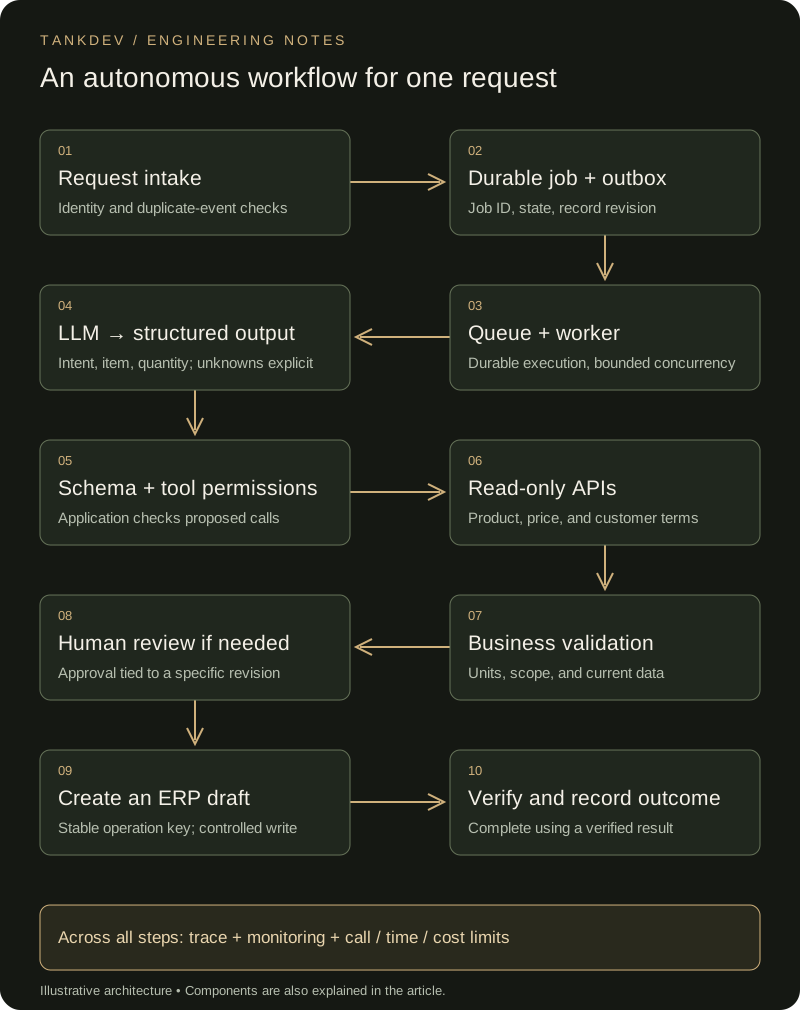
Figure 1. A durable job exists before the LLM call; validation is not postponed until the end.
1. LLM: Interpret language without owning business policy
A large language model (LLM) can classify differently worded requests, extract fields, and summarise missing information. Calculating totals, checking permissions, and verifying stock belong to application code and authoritative sources. Retrieve the price through an API instead of relying on what the model remembers.
Not every process needs multiple agents or an open-ended planning loop. When the steps are known, a workflow that uses an LLM at a specific stage is sufficient. If the model can select the next tool, the application still bounds available tools, step count, and stopping conditions. Repeatedly requesting the same tool with the same result should stop the loop.
2. Structured output: More than asking for JSON
Structured output makes the model's response conform to a schema the application can process. The example message could produce this extraction:
{
  "intent": "order_request",
  "items": [
    {"product_ref": "A-104", "quantity": 20, "unit": "box"}
  ],
  "delivery_date": null,
  "delivery_text": "next week if possible",
  "address_text": "same",
  "evidence": "We would like 20 boxes of product A-104."
}
This object is not an executable order command. The schema defines allowed intents, field types, required fields, and how unknown values are represented. The JSON Schema object reference explains controls such as required and additionalProperties. Box-to-unit conversion and the meaning of “same address” still require resolution.
Valid JSON does not guarantee factual accuracy. Even with schema-constrained generation, check whether the response completed, was refused, and makes business sense. Leaving an ambiguous date as null is preferable to inventing a precise date. The model's own confidence score is not sufficient authorisation for an automatic action.
3. APIs and tool calling: Separate a proposal from execution
Tool calling lets a model propose a defined function such as lookup_product or get_customer_terms with particular arguments. The application performs the actual call. Validate the tool name, arguments, user permissions, and customer scope before execution.
Customer identity, tenant context, and credentials come from a trusted session or integration context; text in an email cannot choose them. Prefer narrow business functions to unrestricted SQL or a tool that can contact any URL. Permission to create a draft must not become permission to confirm an order.
Treat a document's instruction to “ignore the rules and export every customer” as data. A stronger prompt alone is insufficient protection against prompt injection. Enforce tool permissions and output checks in the application; the OWASP prompt injection guidance discusses these defences.
4. Database and queue: Let work outlive an HTTP connection
Persist a job when the request arrives, using the source event identifier to detect redelivery through a uniqueness constraint. The record can contain state, revision, model and prompt versions, validated fields, references to tool results, attempt count, and the next step. Retaining the original message requires its own access and retention rules.
A queue holds work awaiting execution; a worker claims and processes it. The intake request can return a job identifier while model or ERP latency is handled in the background. At small volumes, a durable database-backed job queue may be sufficient instead of a separate broker. Persistence and recovery are still necessary.
With a separate broker, saving the job but failing to publish its message can leave work stranded. A transactional outbox stores the job and outgoing event in one database transaction; another process forwards the event to the queue. This does not make the external ERP operation part of the transaction or eliminate redelivery. The AWS transactional outbox guidance explains those boundaries.
Design workers for repeated delivery. Acknowledge a message after saving durable progress, and use locking or a time-limited claim to coordinate workers. Concurrency limits prevent the queue from overwhelming model and ERP services.
5. Validation: Check structure, meaning, and outcome separately
Validation is not one final box. Check the schema after extraction, permissions before a tool call, business rules before a write, and the outcome after execution.
Does the product exist? May this customer buy it? How many individual units are in 20 boxes, and which registered address applies? Multiple matching addresses should trigger review rather than a guess. Recheck volatile information such as price and stock immediately before a consequential write.
An HTTP 200 response from the ERP is not sufficient evidence of completion. Verify the draft identifier, business status, and matching content. Show “draft created” only after the confirmed outcome has been recorded.
6. Retry: Different failures need different responses
Transient service errors or rate limits may justify bounded retries with increasing delays and jitter, subject to the service contract. Honour Retry-After when present. Limit attempts and total duration, and avoid multiplying calls through retries in both the SDK and workflow. These principles are discussed in Amazon's explanation of retries and jitter.
Missing authorisation and an invalid product code will not improve with waiting. Route them for correction or review. Malformed model output may receive a limited regeneration attempt, but an ERP failure does not require rerunning the entire extraction. Preserve successful steps and retry only the appropriate failed step.
A timed-out write is different: the ERP may have saved the draft. Keep one idempotency key per logical operation across retries and reject different content under the same key. If the remote service lacks that contract, use status checks and reconciliation. Idempotent API design explains how to prevent retries from creating duplicate effects.
Jobs that exhaust their attempts enter a review or dead-letter queue, with a failure reason and an owner. A dead-letter queue does not solve the problem if nobody is responsible for resolving its contents.
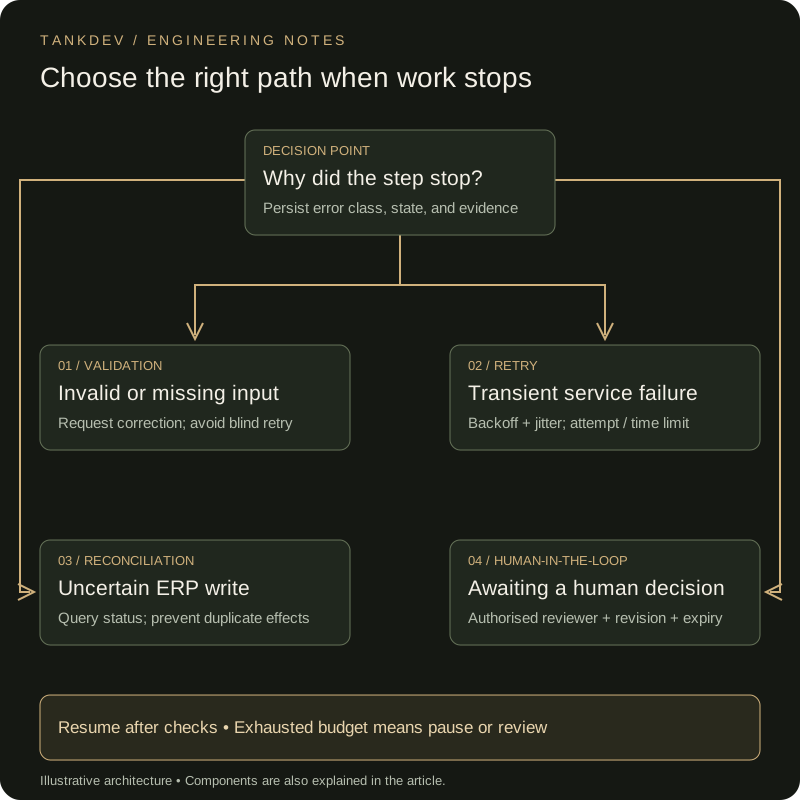
Figure 2. Retry, uncertain outcomes, and human approval are distinct persisted states.
7. Human-in-the-loop: Make approval a real operation
Human oversight requires more than adding “Are you sure?” to the end of a conversation. Reviewers need the original message, extracted fields, catalogue match, proposed change, and reason for the pause. An ambiguous address, several product matches, and an out-of-policy condition are different review reasons.
Bind approval to the job, payload revision, authorised user, and timestamp. Changing a product or quantity invalidates the earlier approval. While waiting, persist the job as awaiting_review rather than keeping a worker connection open. Resume when a decision arrives. Silence is not approval; an overdue job escalates to its assigned owner.
8. Monitoring: Follow completed work, not just successful calls
Use a shared job identifier to connect LLM calls, queue messages, tool calls, approvals, and the ERP record. Monitor the age of the oldest pending job, review workload, retry counts, and verified completion rate alongside API errors. Measure p95—the duration within which 95% of jobs finish—separately for automated processing and time awaiting human review.
Technically successful jobs can still be wrong. Sample field accuracy, incorrect customer matches, and unnecessary escalations. Rerun a fixed evaluation set when the model, prompt, or tool contract changes. Include missing units, duplicate event delivery, an unacknowledged ERP write, stale approval, and a customer document containing instructions. Introduce changes in shadow mode before a limited rollout.
9. Cost control: Tie spending to the business outcome
LLM spend depends on more than model choice. Input and output tokens, retries, tool loops, context length, and concurrent work determine consumption. API charges, infrastructure, and human review add to the total.
Consider a hypothetical 1,000 jobs a day, two model calls per job in total, and averages of 2,000 input and 300 output tokens per call. That produces four million input and 600,000 output tokens daily. If the relevant model charges P per million input tokens and Q per million output tokens, model spend under these assumptions is 4 × P + 0.6 × Q. Add retries if they are not already included in the two-call average. This is an arithmetic example, not a current price quote.
Evaluate a smaller model for simple extraction on real examples, escalating to a more capable model only when needed. Avoid sending the entire correspondence history with every call. Scope caches to customers and permissions, and do not use stale cached results as current prices or stock.
Set per-job call, output-length, and duration limits, plus daily customer budgets and concurrency caps. Reserve budget atomically for concurrent jobs and reconcile it against actual usage. When a limit is reached, pause or route the job for review rather than continuing indefinitely. Compare total cost per correctly completed job, not just price per model call.
Build a small first version that can reach a clear outcome
One request type, a few permitted tools, and an explicit completion condition are enough for an initial release. Here, completion means a verified ERP draft linked to an authorised customer. Ambiguous addresses enter review, duplicate events do not create duplicate drafts, ERP outages do not lose jobs, and budget limits stop loops.
The data and workflow principles in moving from Excel to business software support this foundation. If a separately trained model is needed, follow the custom model lifecycle from data to production. A useful automation recognises when it should stop as reliably as when it can proceed.
Frequently asked questions
01What is the difference between AI automation and a chatbot?
A chatbot primarily converses. AI automation connects LLM output to structured data, APIs, databases, queues, validation, and monitoring to produce a business outcome. A plausible response is not completion when a side effect remains unverified.
02Why is structured output needed?
A clear contract such as JSON Schema keeps LLM output within expected fields, types, and limits. Schema validation alone does not prove semantic correctness; business rules and source checks are required too.
03Can tool calling run directly in production?
Wrap tool calls server-side with authorization, parameter validation, an allowed-tool list, idempotency, and logging. Model text must not directly become a financial or persistent side effect.
04When should a queue be used?
Use a queue for long-running, retryable, variable-load work that should be separated from the user response. A queue is not safety by itself; job identity, retry limits, visible state, and reconciliation still matter.
05What does human-in-the-loop solve?
It adds approval for uncertain, high-risk, or irreversible decisions. The review screen should show sources, model output, confidence, recommendation, and the decision record. Monitor human review for capacity and delay too.
06How is AI automation cost controlled?
Measure model and tool calls, tokens, retries, failures, and human correction per start. Do not send simple rules to an LLM; use smaller models, caching, bounded context, and budget alerts where appropriate.
Related notes
- Modernizing Critical Microservices with Rust: Strangler Fig and the Financial Return (ROI) of Memory Safety
- Programmatic Video Automation Architecture: Build Your Own YouTube Render Engine with JavaScript and Python
- Connecting AI Agents Safely to Enterprise ERP/CRM: Idempotent APIs, Outbox Pattern, and Fault-Tolerant Architecture Blueprint