

From Excel to Business Software: When Should a Workflow Become a Custom Application?
When does work managed in Excel, email, and WhatsApp need custom software? A practical guide to shared data, permissions, workflow, audit logs, reporting, and APIs.
· TankDev Engineering
A business process deserves a proper system when finding the correct record, assigning the next action, and tracing changes require constant manual coordination. The threshold is not the number of rows in an Excel file. It is the point at which reliable work depends on people reminding one another and reconciling competing records.
Excel is useful for calculations and analysis, email for correspondence, and WhatsApp for quick communication. Problems arise when each tool holds a separate version of the same order's status. A price changes in one place, approval arrives in another, and an old delivery date remains elsewhere. Each record can look plausible without forming a consistent process.
We will use an illustrative customer-request-to-order workflow. The purpose is to show what changes when data, permissions, and business rules are managed together, rather than assuming that every spreadsheet needs replacement.
The problem is fragmented decisions, not file size
Imagine sales preparing a quotation in Excel, the customer requesting revisions by email, and a manager approving a discount over WhatsApp. Operations copies the order into another tracking list. If the customer subsequently changes the quantity, which quotation version did the manager approve?
The risk begins with the structure of the process before it becomes an individual mistake. The record, approval, and execution are disconnected. As work grows, the team spends more time establishing what happened and less time moving it forward.
Shared files and version history can reduce some problems. But access to a file is not the same as permission to view a particular customer, approve a discount, or modify an approved order. More detailed business rules require a more deliberate design.
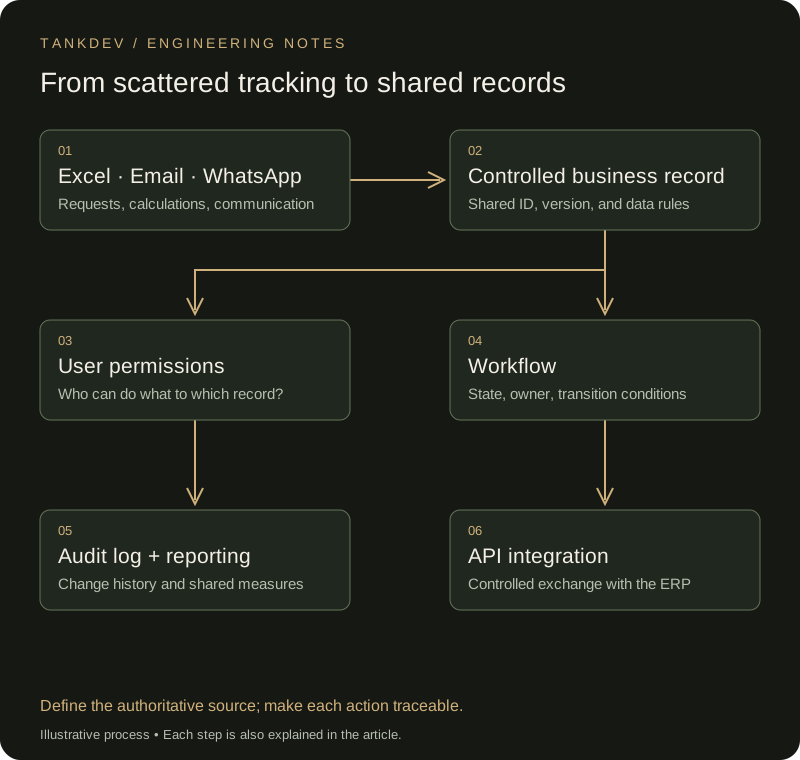
Figure 1. Communication channels can remain in use; the shared record holds operational status.
Five practical signs that a transition is worth evaluating
- Repeated entry: Customer details, amounts, and delivery dates are copied into different lists, and corrections do not reach every copy.
- Work moves through reminders: Someone must chase approvals, and progress stops when the usual owner is away.
- Unclear permissions: Viewing, editing, and approving cannot be separated reliably.
- History must be reconstructed: Disputes lead to searches through old emails and screenshots.
- Reporting becomes reconciliation: Before meetings, teams compare lists to establish which number is correct.
Support the decision with visible costs. In a purely hypothetical example, 300 monthly transactions with eight minutes of duplicate entry and checking each consume 40 hours a month. Do not assume automation will recover all of that time. Measure the recoverable portion in a pilot, and track rework and waiting costs separately.
Is custom software always the right first choice?
First assess relevant modules in the existing ERP or CRM, packaged workflow products, and low-code tools. A standard process whose permissions and integrations fit an existing product may not need development from scratch.
Custom software becomes more compelling when company-specific decision rules, required connections between systems, or difficult exceptions cannot be maintained adequately in available products. Compare maintenance, support, data migration, training, and exit costs alongside licensing and initial development.
If ownership and approval rules are still unclear, settle them first. Encoding an ambiguous process does not resolve the ambiguity.
A central database: Give each piece of work an identity
A central database provides a shared record and identifier for each business object within the application. Customers, quotations, quotation revisions, approvals, and orders become linked records. Use a customer identifier instead of repeatedly matching names, and explicitly store the quotation version an approval covers.
Uniqueness, required-field, and relationship constraints can prevent some invalid records at the database level. Changes that must remain consistent belong in an appropriate transaction. The PostgreSQL documentation on constraints and transactions provides a technical starting point.
“Central” does not require moving all company data into a single physical database. The ERP may remain authoritative for accounting while the new application owns the quotation workflow. What matters is identifying which system is authoritative for each field.
Also prevent two users from silently overwriting one another's work. A record-version check can reject an update based on stale data and ask the user to review the current version.
User permissions: Signing in does not authorise every action
Authentication establishes who a user is; authorisation establishes what they may do to a particular record. A salesperson might edit quotations for their own customers, while a manager approves discounts. Finance and warehouse staff need different information and actions.
Hiding a button is insufficient. The server must validate the requested action and access to the record on every request. Denying access by default and granting necessary privileges are core principles in the OWASP authorisation guidance.
Permissions should change when someone's responsibilities change. Temporary delegation can have a defined scope and expiry; shared accounts obscure who performed an action.
Workflow: Let the system identify the next owner
A workflow defines business states and the conditions for moving between them. A quotation might move through draft, awaiting approval, approved, and converted to order. Return and cancellation paths also need explicit rules.
Every transition has an owner, required information, and permitted action. A discount above a defined limit goes to a manager. A material price or quantity change can invalidate the previous approval and require another review. An overdue task escalates to a named person; the system does not silently treat a missed deadline as approval.
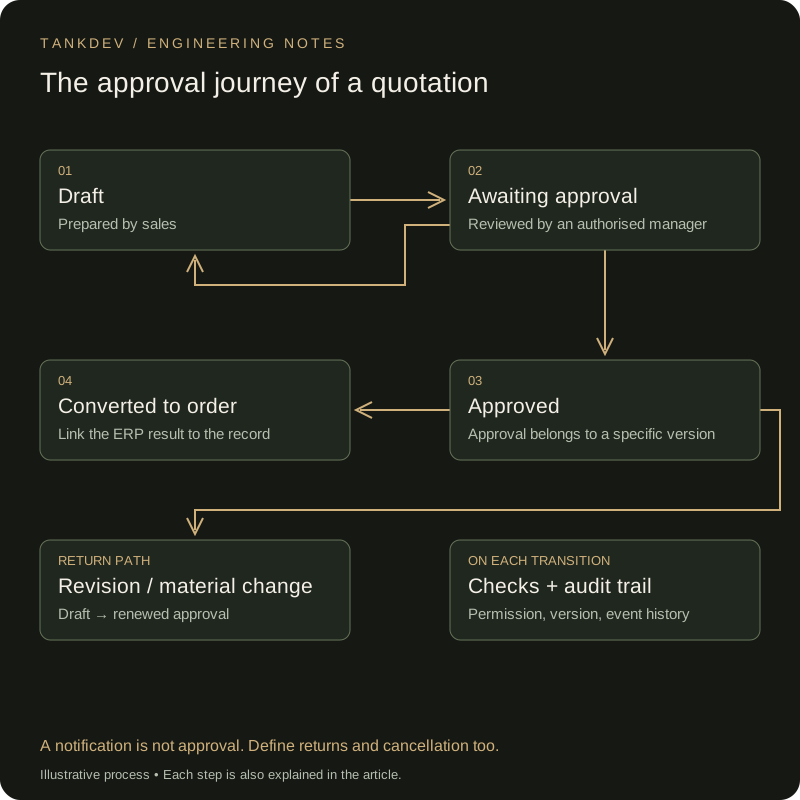
Figure 2. Return paths and the version covered by an approval matter as much as state names.
Email or WhatsApp notifications can direct users to the record. Sending a message does not establish that approval occurred. Approval should be a verified action by an authorised user against a specific version of the record.
Audit log: Preserve how the record changed
An audit log records who performed a meaningful action, when, and on which record. For critical changes it may also preserve previous and new values, the reason, record version, and operation identifier. That answers both “What is the amount now?” and “Did the amount change after approval?”
Ordinary users should not be able to modify that history, and access and retention need defined rules. A log table alone does not guarantee tamper resistance. Depending on the risk, separate storage and integrity controls may be necessary. Avoid logging passwords, access keys, or unnecessary personal information. The OWASP logging guidance discusses what to record and how to protect it.
Reporting: Agree on the meaning of each measure first
Shared records allow teams to report using common definitions. Adding a chart does not settle the definition of “completed”: does it mean an approved quotation, an order created, or goods delivered? Are cancellations included? Which reporting period applies?
Connect the first reports to bottlenecks: approval waiting time, the share of quotations returned for revision, work blocked by integration failures, and on-time completion. Event history supplies the underlying data. If heavy reporting slows operational work, consider a separate read infrastructure and show users how current the reported data is.
API integration: Reduce repeated entry between systems
An API allows systems to exchange data and operations through a defined contract. An approved quotation can create an order in the ERP, with the resulting order number returned to the application. Field mappings, permissions, failure handling, and retry rules must be explicit.
If the ERP does not respond, the order may still have been created. Resending the request can create a duplicate. Use an operation key for safe retries; if the remote system does not support that, design status checks and reconciliation. Distinguish transferring, awaiting verification, and failed states in the interface.
Start with one critical workflow
Choose a bounded flow such as request–approval–order instead of making the first release cover every department. Document normal work and exceptions with the process owner. Clean the existing data and rehearse migration. Compare amounts, relationships, and open-work status as well as record counts.
Allowing the same pilot transactions to be edited independently in both Excel and the application creates another reconciliation problem. Establish the authoritative record for the pilot. Train users with realistic examples and exercise unauthorised actions, concurrent edits, interrupted integrations, and backup restoration.
Do not measure success by the number of screens delivered. Is it easier to find an owner, see a pending approval, correct a failed transfer, and explain a record's history? A custom application creates value when those answers become part of a working system rather than relying on individual memory.
Frequently asked questions
01When should Excel become business software?
Consider a change when one file acts as the operational record, approval mechanism, reporting system, and customer history at once. The decision depends less on row count than on concurrent change, permissions, error cost, and traceability needs.
02Should Excel be abandoned completely?
No. Excel remains strong for analysis, temporary calculation, and export. The problem is using it as the authoritative transaction record and workflow. Controlled exports from a central system preserve Excel as a safe analysis tool.
03Why are WhatsApp and email approvals risky?
They disconnect a decision from the record version and authorized person. A message may be searchable, yet it remains unclear which version was approved, what changed later, and who should see it. A workflow should attach approval to the transaction record.
04What does a central database provide?
It provides one record, field validation, relationship integrity, concurrency control, and reportable history. A database alone is not a business process; design it with authorization, workflow, and an interface.
05Why are RBAC and audit logs needed?
RBAC limits access by role. An audit log preserves which user or service changed which record, when, and how. Together they support reliable error investigation and audit.
06How should the transition start?
Start with the process causing the most errors and repeated work. Define fields, owners, rules, and acceptance criteria; plan data cleansing, migration, and read-only archiving of the old file. A small working first release is safer than an undefined large transformation.
Related notes
- Modernizing Critical Microservices with Rust: Strangler Fig and the Financial Return (ROI) of Memory Safety
- Programmatic Video Automation Architecture: Build Your Own YouTube Render Engine with JavaScript and Python
- Connecting AI Agents Safely to Enterprise ERP/CRM: Idempotent APIs, Outbox Pattern, and Fault-Tolerant Architecture Blueprint